How Memryze works
- 1
Capture
Type or dictate a note, or scan and upload a document.
- 2
Organize
Notes group themselves by date; folders keep the rest in order.
- 3
Ask
Ask in plain English and get an answer from only what's yours.

Beautifully organized, automatically
Every note lands exactly where you'd expect — grouped into Pinned, Today, Yesterday, This Week, and by month — with zero manual sorting. Pin the notes you check often so they never get buried.
- Automatic Today / Yesterday / This Week / by-month grouping
- Pin your most-used notes to the top
- Capture offline — notes queue locally and sync the moment you're back online

Never miss what matters
Turn any note into more than plain text — add checklists, bold key lines, and headers, then attach a due date. Memryze reminds you right when it counts, and your notes stay searchable by time ("this week," "in June," "upcoming").
- Checklists with tappable checkboxes
- Bold, italic, headers, and bullet formatting
- Dictate a note by voice instead of typing it
- Due dates with reminders that fire on time

Everything in its place
Group notes and documents into folders that match how you actually think — Health, Work, Property, or whatever fits. Every folder shows a live count, so you always know what's waiting.
- Create, rename, and reorder folders freely
- Move notes and documents between folders anytime
- Filter your Ask questions to a single folder

Your paperwork, finally findable
Point your camera at a lease, a prescription, or a receipt and Memryze turns it into a searchable document — or upload a PDF and photos you already have. Text is recognized on your device, so the page becomes searchable without the image going anywhere first.
- Scan with the camera, or upload PDFs and photos
- On-device text recognition makes every page searchable
- File documents into the same folders as your notes

The gist, without reading all of it
Ask Memryze to summarize a document and get the key points in seconds — parties, dates, amounts, obligations — organized into sections you can skim. Summarize the whole thing, or just the pages you care about.
- Summarize a whole document or a page range
- Summaries are saved, so re-opening one is instant
- The original is always one tap away
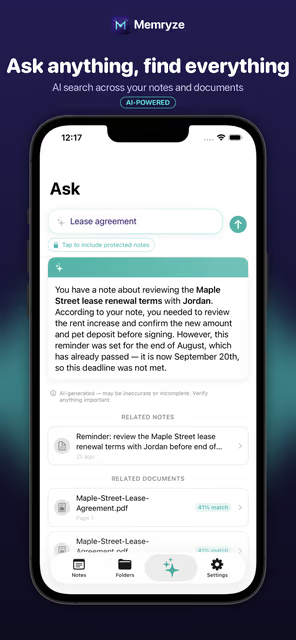
Ask across everything you've saved
Type a real question — "When does the lease renew?" — and get a concise, AI-generated answer pulled only from your own notes and documents, with the sources linked right below. If nothing relevant exists, Memryze tells you honestly instead of guessing.
- Natural-language questions, not keyword search
- Searches your notes and your uploaded documents together
- Every answer links back to its source, down to the page

Truly private, item by item
Lock any individual note or document with Face ID — right from the item itself — so a prescription or a signed contract stays hidden until you choose to unlock it. Add an app-wide lock too, for a second layer whenever you hand your phone to someone else.
- Face ID / passcode lock on any single note or document
- Optional app-wide lock on top
- Choose whether protected items are included in Ask results, per question

Your data. Your rules.
Memryze is built to keep your notes and documents private, not to mine them. Your content is isolated to your account, never used to train any AI model, and yours to export or permanently delete at any time.
- Never used to train AI, period
- Isolated to your account — no sharing, no cross-account access
- Export or delete everything, anytime, right from Settings
Works beautifully on iPad, too
Memryze isn't a stretched-out iPhone app — the iPad layout uses a real sidebar-and-detail view built for the bigger screen, so browsing, organizing, reading documents, and asking questions all feel native to the device you're on.


- Unlimited notes, folders & checklists
- Due dates & reminders
- Voice dictation
- Face ID note protection
- Unlimited AI questions for your first 3 months, then 20 free each month
- Everything in Free
- Scan & upload documents — PDFs and photos
- AI document summaries
- Unlimited AI questions
- Cancel anytime in App Store Settings
Frequently asked questions
What is Memryze?
Memryze keeps your notes and documents in one place. Scan or upload a PDF, get an instant AI summary, and ask plain-English questions answered only from what you've saved.
Which devices does it work on?
Memryze is a universal app for iPhone and iPad, with a native iPad layout built around a sidebar and detail view.
Is Memryze free?
Yes. Free includes unlimited notes, folders and checklists, due dates and reminders, voice dictation, Face ID note protection, and unlimited AI questions for your first 3 months, then 20 free each month. Premium is $5.99 per month and adds document scanning and upload, AI document summaries, and unlimited AI questions.
Is my data used to train AI?
Never. Your content is isolated to your account, never used to train any AI model, and you can export or permanently delete everything at any time from Settings.
Can I protect sensitive notes?
Yes. Lock any individual note or document with Face ID or your passcode, and optionally add an app-wide lock on top.
Does it work offline?
You can capture notes offline. They queue locally and sync the moment you're back online.
How do I cancel Premium?
Cancel anytime in your App Store subscription settings.